

Reading long text on screens can be tiring. Articles, documents, scripts, and notes often take time to read and understand. Because of this, many users now rely on free text to speech tools to listen instead of read.
In this blog, you’ll learn:
- What text to speech is
- How text to speech works
- How to use the tool step by step
- How we built this app using PromptXL
What Is Text to Speech?
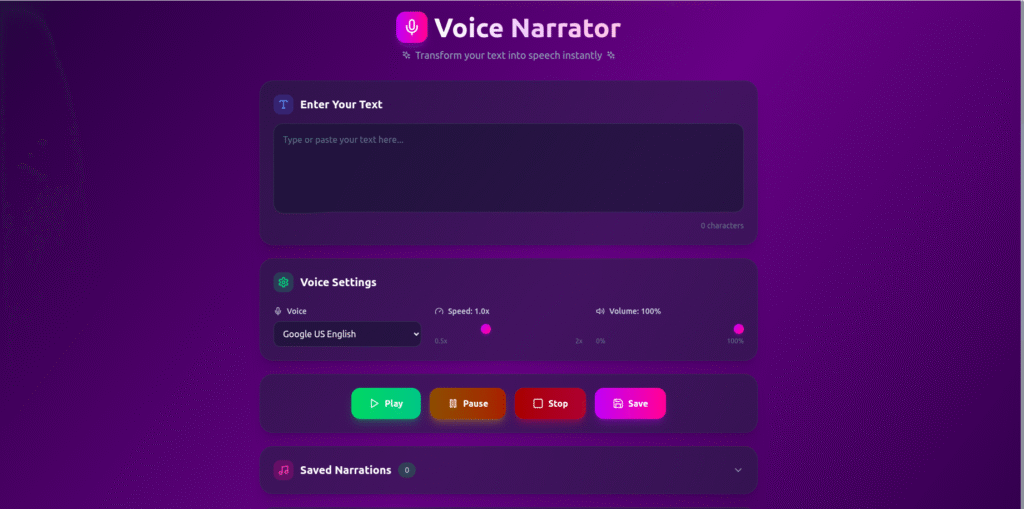
Text to speech is a technology that converts written text into spoken audio. Instead of reading paragraphs on a screen, users can listen to natural-sounding voices.
This is useful when you want to:
- Listen while multitasking
- Improve accessibility
- Review content faster
- Consume text hands-free
As a result, information becomes easier to access and understand.
How Text to Speech Works
Although the experience feels simple, text to speech follows a clear process behind the scenes.
Step 1: Enter the Text
First, the user types or pastes text into the input box. This can be a sentence, paragraph, or full article.
Step 2: Language and Voice Processing
Next, the system analyzes the text. It identifies:
- Language
- Sentence structure
- Punctuation and pauses
This step helps produce natural and clear speech.
Step 3: Speech Generation
Then, an AI voice engine converts the processed text into audio. The system adjusts:
- Pronunciation
- Tone
- Speed
Because of this, the output sounds smooth and human-like.
Step 4: Audio Playback
Finally, the user can:
- Play the audio
- Pause or replay
- Download the speech file
The entire process usually takes only a few seconds.
How to Use the Text to Speech Tool
Using the text to speech tool is very easy:
- Enter or paste your text
- Choose the voice or language (if available)
- Click “Convert”
- Listen or download the audio
No software installation is required. Therefore, anyone can use it directly from a browser.
Who Can Use Text to Speech?
This tool helps many types of users, including:
- 🎓 Students listening to study notes
- ✍️ Writers reviewing drafts
- 🎙️ Content creators generating voiceovers
- ♿ Users who need accessibility support
- 📚 Professionals reviewing documents
Because it works online, it fits both personal and professional needs.
Why We Built This Text to Speech Tool Using PromptXL
We built this text to speech app using PromptXL.
PromptXL allowed us to:
- Build the app with real project files
- Control speech generation logic
- Choose flexible AI voice models
- Keep the app fast and scalable
Instead of using a closed AI builder, PromptXL gave us full ownership of the code.
How PromptXL Helps Build Better AI Voice Tools
With PromptXL, we were able to:
- Integrate AI speech engines cleanly
- Customize voice output logic
- Handle large text inputs efficiently
- Add future features without limits
Because PromptXL supports bring-your-own API keys, we can control performance and costs easily.
Text to Speech vs Typical Online Tools
| Feature | Typical TTS Tools | Built with PromptXL |
|---|---|---|
| Voice quality | Average | High |
| Custom control | Limited | Flexible |
| File ownership | None | Full |
| Scalability | Low | High |
| Deployment freedom | Restricted | Anywhere |
As shown above, building with PromptXL offers long-term advantages.
Can This Text to Speech Tool Grow Further?
Yes. Since it’s built using PromptXL, we can:
- Add multiple voices
- Support more languages
- Introduce user accounts
- Offer paid plans later
This makes it suitable for both free users and future expansion.
Final Thoughts
A text to speech tool makes content easier to consume, more accessible, and more flexible. Instead of reading everything on a screen, users can simply listen.
By building this app with PromptXL, we ensured:
- Natural-sounding output
- Clean and scalable architecture
- Full control over the code
- No platform lock-in
If you want to build practical AI tools like this, PromptXL gives you the right foundation.
🚀 Build Your Own AI PDF Summarizer
Create your project: https://app.promptxl.com
Learn more: https://promptxl.com
Build real AI tools with full control, real files, and multi-LLM intelligence.
If you want to explore more free AI tools, check out the PromptXL Marketplace:
https://app-market.promptxl.com/
Build real AI tools with full control, real files, and multi-LLM intelligence.