

Images are everywhere—screenshots, photos, scans, and designs. However, sharing multiple images one by one is not always convenient. Because of this, many users prefer converting Free Image to PDF to combine everything into a single, easy-to-share file.
In this blog, you’ll learn:
- What Image to PDF means
- How Image to PDF conversion works
- How to use the tool step by step
- How we built this app using PromptXL
What Is Image to PDF?
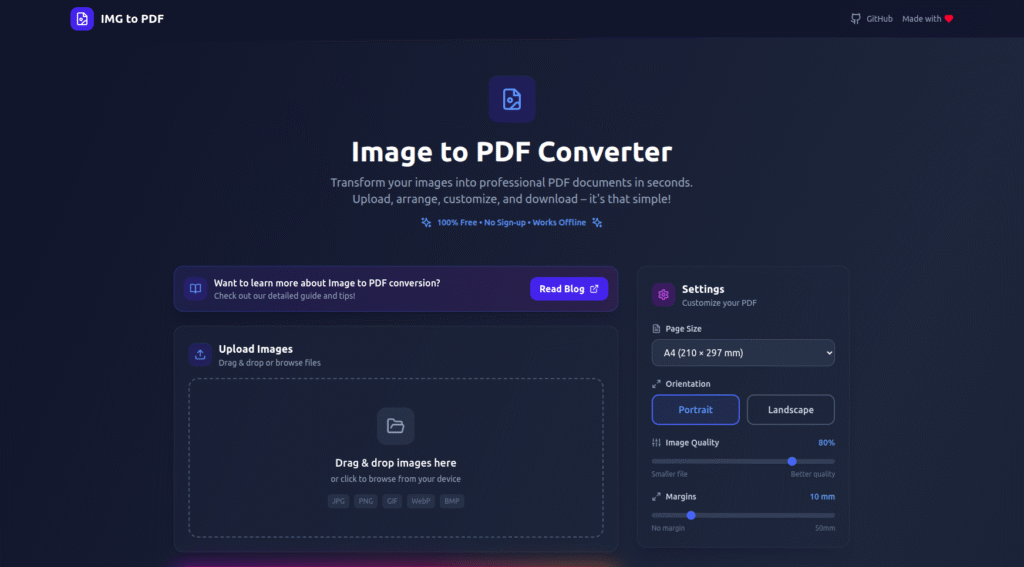
Free Image to PDF is a process that converts one or more image files into a single PDF document. Instead of sending multiple images, users can share one clean document.
This is useful when you want to:
- Combine multiple images into one file
- Create printable documents
- Share scans or photos professionally
- Archive images in document format
As a result, image collections become easier to manage and share.
How Image to PDF Conversion Works
Although the tool feels simple, it follows a clear process behind the scenes.
Step 1: Upload Images
First, the user uploads image files such as JPG, PNG, or WebP. Multiple images can be selected at once.
Step 2: Image Ordering
Next, the system arranges the images in the selected order. Users can reorder images if needed.
Step 3: Convert Images to PDF
Then, the tool converts each image into a PDF page. During this step, it:
- Preserves image quality
- Maintains correct orientation
- Fits images properly on each page
Because of this, the final PDF looks clean and professional.
Step 4: Download the PDF
Finally, the user downloads the generated PDF file. The document is ready for sharing, printing, or storage.
The entire process takes only a few seconds.
How to Use the Image to PDF Tool
Using the Image to PDF tool is very easy:
- Upload one or more images
- Arrange the image order
- Click “Convert to PDF”
- Download the PDF file
No software installation or sign-up is required. Therefore, anyone can use it directly from a browser.
Who Can Use Image to PDF?
This tool is useful for many people, including:
- 🎓 Students submitting assignments
- 📄 Professionals sharing documents
- 📷 Users converting scanned photos
- 🧾 Businesses preparing reports
- 👤 Anyone organizing images
Because it works online, it fits both personal and professional needs.
Why We Built This Image to PDF Tool Using PromptXL
We built this Image to PDF converter using PromptXL.
PromptXL allowed us to:
- Build the app with real project files
- Handle image uploads securely
- Control PDF generation logic
- Keep the app fast and scalable
Instead of using a closed document builder, PromptXL gave us full ownership of the code.
How PromptXL Helps Build Better File Conversion Tools
With PromptXL, we were able to:
- Write clean backend logic
- Process multiple files efficiently
- Maintain high output quality
- Add new features without platform limits
Because PromptXL supports flexible deployment, this tool can grow over time.
Image to PDF vs Typical Online Tools
| Feature | Typical Image-to-PDF Tools | Built with PromptXL |
|---|---|---|
| Image quality | Medium | High |
| File control | Limited | Flexible |
| Speed | Inconsistent | Fast |
| Code ownership | None | Full |
| Scalability | Low | Strong |
This makes PromptXL-built tools more reliable in the long run.
Can This Image to PDF Tool Grow Further?
Yes. Since it’s built using PromptXL, we can:
- Add bulk uploads
- Support password-protected PDFs
- Offer API access
- Introduce paid plans later
This makes it suitable as both a free tool and a future SaaS product.
Final Thoughts
Converting Image to PDF helps users organize, share, and store images more effectively. Instead of managing multiple files, users get one clean document.
By building this tool with PromptXL, we ensured:
- High-quality PDF output
- Clean and scalable architecture
- Full control over the code
- No platform lock-in
If you want to build practical file tools like this, PromptXL gives you the right foundation.
🚀 Build Your Own AI PDF Summarizer
Create your project: https://app.promptxl.com
Learn more: https://promptxl.com
Build real AI tools with full control, real files, and multi-LLM intelligence.
If you want to explore more free AI tools, check out the PromptXL Marketplace:
https://app-market.promptxl.com/
Build real AI tools with full control, real files, and multi-LLM intelligence.