

Introduction
In today’s Free Digital Signature Generator world, paperwork is no longer limited to physical documents and handwritten signatures. Businesses, professionals, students, and government organizations are rapidly moving toward secure and paperless workflows. One of the most important tools enabling this transformation is a Digital Signature Generator.
A Digital Signature Generator allows users to sign documents securely online, verify authenticity, and ensure that documents cannot be altered after signing. From contracts and agreements to academic forms and official records, digital signatures have become a trusted and legally accepted solution.
In this blog, we’ll explore what a digital signature generator is, how it works, why it matters, and how a digital signature generator can help you sign documents securely online with confidence.
What Is a Free Digital Signature Generator?
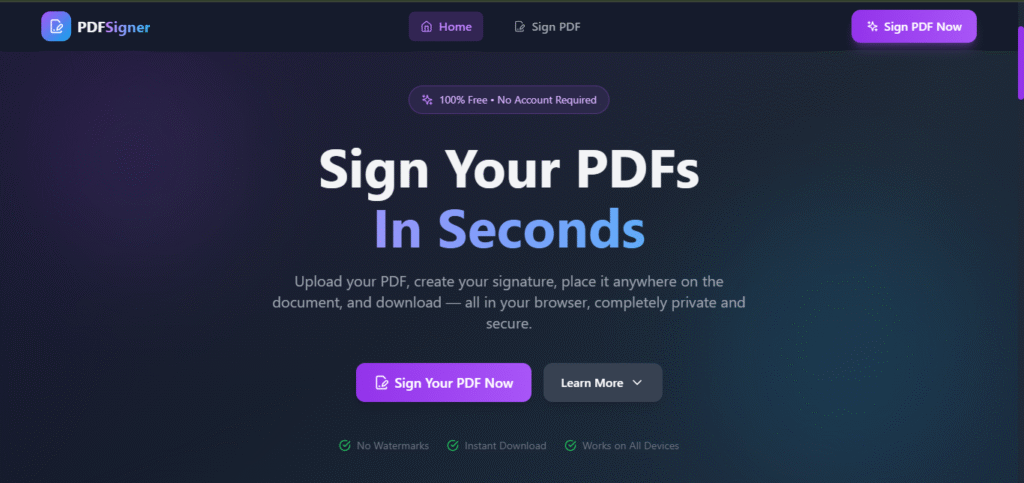
A Digital Signature Generator is an online tool or application that creates cryptographic digital signatures for electronic documents. Unlike typed names or scanned signatures, digital signatures use encryption technology to bind the signer’s identity to the document.
A Digital Signature Generator enables users to:
- Upload documents (especially PDFs)
- Apply a secure digital signature
- Verify document authenticity
- Prevent unauthorized changes
Digital signatures are widely used in business, legal, educational, and government processes.
Free Digital Signature Generator vs Electronic Signature
Many people confuse digital signatures with electronic signatures, but they are not the same.
Electronic Signature
- Simple typed or drawn signature
- Minimal security
- Easy to copy or modify
Digital Signature
- Cryptographically generated
- Verifies signer identity
- Detects document tampering
- Legally recognized in many countries
A digital signature generator focuses on security, integrity, and trust, making it suitable for serious and official use.
How a Free Digital Signature Generator Works
A digital signature generator follows a secure and structured process.
Step 1: Upload the Document
Users upload a document—most commonly a PDF file—into the app.
Step 2: Generate a Document Hash
The system creates a unique digital fingerprint (hash) of the document using cryptographic algorithms.
Step 3: Create Cryptographic Keys
The generator uses a private key to sign the document and a public key for verification.
Step 4: Sign the Document
The hash is encrypted using the private key, forming the digital signature.
Step 5: Attach the Signature
The digital signature is embedded into the document.
Step 6: Verification
Anyone can verify the signature using the public key. If the document changes, verification fails.
Why Free Digital Signature Generator Are Important
1. Security
Digital signatures ensure documents cannot be altered after signing.
2. Authenticity
They verify the identity of the signer.
3. Integrity
Any modification to the document invalidates the signature.
4. Legal Acceptance
Digital signatures are legally valid in many regions.
5. Efficiency
Sign documents instantly without printing or scanning.
Benefits of Using a Free Digital Signature Generator
Cost-Effective
No need for paid software or physical paperwork.
Easy to Use
Simple upload-and-sign workflow.
Time-Saving
Sign documents in seconds.
Environment Friendly
Reduces paper usage.
Remote Access
Sign documents from anywhere.
Key Features of a Free Digital Signature Generator
PDF Upload Support
Upload and sign PDF documents securely.
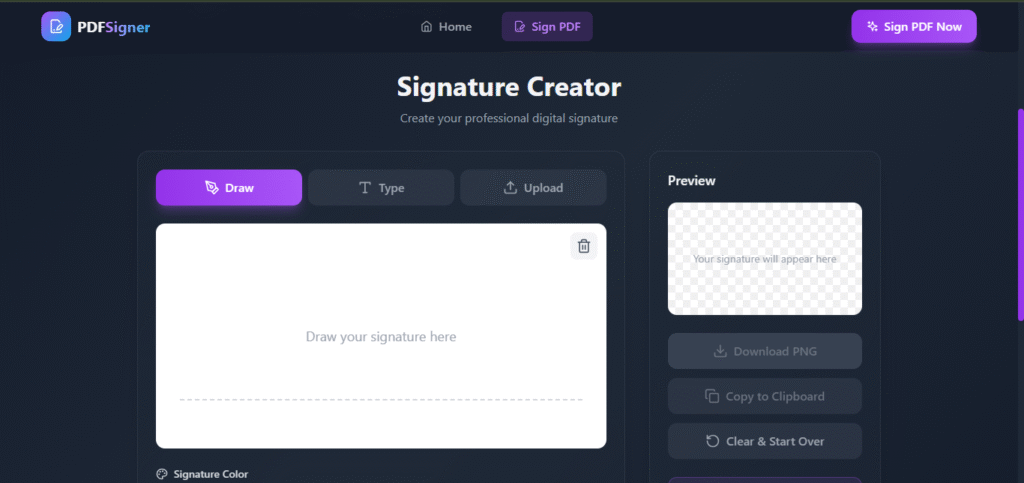
Signature Placement
Choose where the signature appears in the document.
Secure Encryption
Industry-standard cryptographic algorithms.
Instant Download
Download signed documents immediately.
No Data Storage
Files are deleted after signing for privacy.
Common Use Cases in Free Digital Signature Generator
Business & Corporate
- Contracts
- Agreements
- NDAs
Legal Sector
- Legal filings
- Client authorizations
Education
- Certificates
- Application forms
Government
- Official forms
- Approvals
Freelancers & Remote Workers
- Client contracts
- Invoices
Free Digital Signature Generator for PDF Documents
PDF is the most commonly used format for digital signing. A digital signature generator optimized for PDFs ensures:
- Layout preservation
- Secure embedding
- Easy verification
- Compatibility across devices
This makes PDF digital signing reliable and professional.
Security & Privacy Considerations
A trusted digital signature generator follows strict security practices:
- End-to-end encryption
- No document retention
- Secure key handling
- Tamper detection
Your documents remain private and protected.
Legal Validity of Free Digital Signature Generator
Digital signatures are legally recognized under various laws:
- IT Act (India)
- ESIGN Act (USA)
- eIDAS Regulation (EU)
Always ensure compliance based on your region and use case.
How to Choose the Best Free Digital Signature Generator
- PDF support
- Strong encryption
- No hidden fees
- Easy verification
- Clear privacy policy
Free vs Paid Digital Signature Tools
| Feature | Free Tool | Paid Tool |
|---|---|---|
| Basic signing | Yes | Yes |
| Advanced certificates | Limited | Yes |
| Cost | Free | Subscription |
| Ease of use | High | Medium |
Free digital signature generators are perfect for everyday signing needs.
SEO Benefits of Offering a Free Digital Signature Generator Tool
If you run a tools website or SaaS platform, offering a Digital Signature Generator can:
- Drive organic traffic
- Increase user trust
- Improve engagement
- Reduce bounce rate
Future of Free Digital Signature Generator
The future includes:
- Blockchain-based signatures
- AI-assisted verification
- Cross-platform validation
- Global legal standardization
Digital signatures will continue to be a cornerstone of secure digital workflows.
Best Practices for Using Digital Signature Generator
- Always verify signed documents
- Use strong passwords
- Store signed files securely
- Avoid sharing private keys
Final Thoughts
This App was created using PromptXL, an AI-assisted content creation system designed to produce clear, structured, SEO-friendly, and user-focused information. PromptXL helps organize ideas, improve readability, and ensure content remains practical and valuable for real users.
A Digital Signature Generator – Sign Documents Securely Online is no longer a luxury—it’s a necessity. With a promptxl , anyone can sign documents securely, verify authenticity, and streamline workflows without cost or complexity.
Whether you are a student, professional, or business owner, digital signatures save time, protect data, and enable trusted digital communication.
🚀 Build Without Platform Limits
Create your project: https://app.promptxl.com
Learn more: https://promptxl.com