

Working with colors is a daily task for designers and developers. However, different tools and platforms use different color formats. Because of this, a HEX RGB converter becomes essential when switching between design and development workflows.
In this blog, you’ll learn:
- What a HEX RGB converter is
- How it works behind the scenes
- How to use the tool step by step
- How we built this app using PromptXL
What Is a HEX RGB Converter?
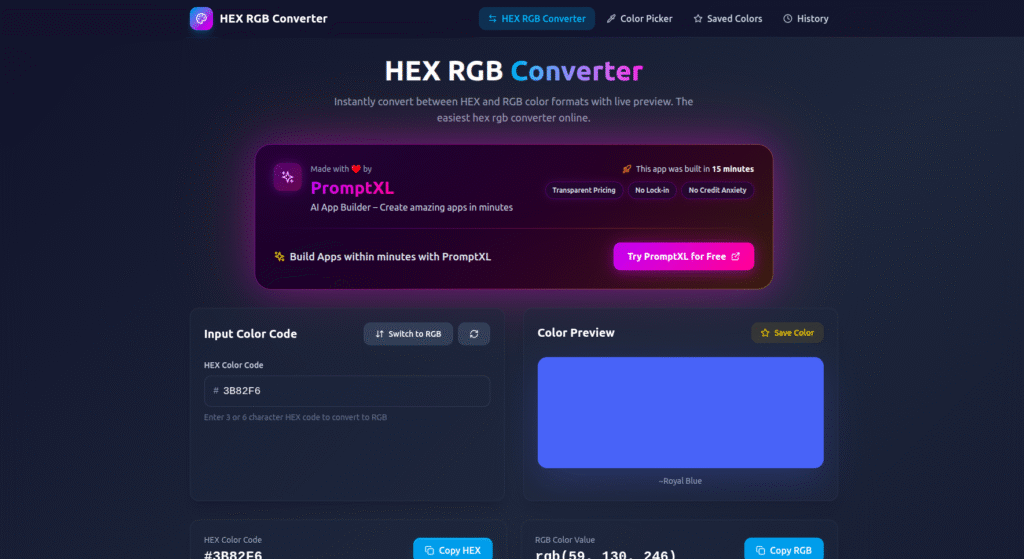
A HEX RGB converter is a tool that converts color values between HEX and RGB formats.
- HEX colors are commonly used in CSS and design tools
- RGB values are often used in programming, animations, and image processing
By converting between these formats, colors stay consistent across platforms.
How a HEX RGB Converter Works
Although the tool looks simple, it follows a clear logic internally.
Step 1: Enter a Color Value
First, the user enters a HEX color code (for example, #FF5733) or an RGB value.
Step 2: Color Parsing
Next, the system reads the input and separates the color components:
- Red
- Green
- Blue
Each value is calculated accurately to avoid color mismatch.
Step 3: Format Conversion
Then, the converter transforms the values:
- HEX → RGB
- RGB → HEX
Because the calculation is precise, the output color always matches the original.
Step 4: Instant Output
Finally, the converted color is displayed instantly. Users can copy the result with one click.
The entire process happens in real time.
How to Use the HEX RGB Converter
Using the HEX RGB converter is very easy:
- Enter a HEX or RGB color value
- Click the “Convert” button
- View the converted color
- Copy the result
No design software or installation is required. Therefore, anyone can use it directly in a browser.
Who Can Use a HEX RGB Converter?
This tool is useful for many people, including:
- 🎨 UI / UX designers
- 💻 Frontend developers
- 📱 App builders
- 🖌️ Digital artists
- 👤 Beginners learning color formats
Because it’s simple and fast, it fits both professional and casual use.
Why We Built This HEX RGB Converter Using PromptXL
We built this HEX RGB converter using PromptXL.
PromptXL allowed us to:
- Build the app with real project files
- Implement accurate color conversion logic
- Keep the tool lightweight and fast
- Maintain full control over the code
Instead of using a closed color library, PromptXL gave us flexibility and ownership.
How PromptXL Helps Build Better Utility Tools
With PromptXL, we were able to:
- Write clean frontend and backend logic
- Test color calculations easily
- Add features like copy buttons and previews
- Extend the tool without rewriting it
Because PromptXL supports flexible deployment, this tool can scale anytime.
HEX RGB Converter vs Typical Online Tools
| Feature | Typical Color Converters | Built with PromptXL |
|---|---|---|
| Conversion accuracy | Medium | High |
| Speed | Average | Instant |
| Custom control | Limited | Flexible |
| Code ownership | None | Full |
| Scalability | Low | Strong |
As shown above, PromptXL-built tools are more reliable long term.
Can This HEX RGB Converter Grow Further?
Yes. Since it’s built using PromptXL, we can:
- Add HSL and CMYK support
- Show live color previews
- Save favorite colors
- Turn it into a design toolkit
This makes it useful both as a free tool and a future product.
Final Thoughts
A HEX RGB converter makes color handling simple, accurate, and fast. Instead of guessing values, users can convert colors instantly and confidently.
By building this tool with PromptXL, we ensured:
- Precise conversion
- Clean architecture
- Full code ownership
- Zero platform lock-in
If you want to build useful developer tools like this, PromptXL gives you the right foundation.
🚀 Build Your Own AI PDF Summarizer
Create your project: https://app.promptxl.com
Learn more: https://promptxl.com
Build real AI tools with full control, real files, and multi-LLM intelligence.
If you want to explore more free AI tools, check out the PromptXL Marketplace:
https://app-market.promptxl.com/
Build real AI tools with full control, real files, and multi-LLM intelligence.