

Posting images on social media can be tricky. Each platform has its own image size rules, and resizing manually takes time. Because of this, many creators, marketers, and businesses now rely on a free social media image resizer to get perfect image sizes instantly.
In this blog, you’ll learn:
- What a free social media image resizer is
- How it works behind the scenes
- How to use it step by step
- How we built this app using PromptXL
What Is a Free Social Media Image Resizer?
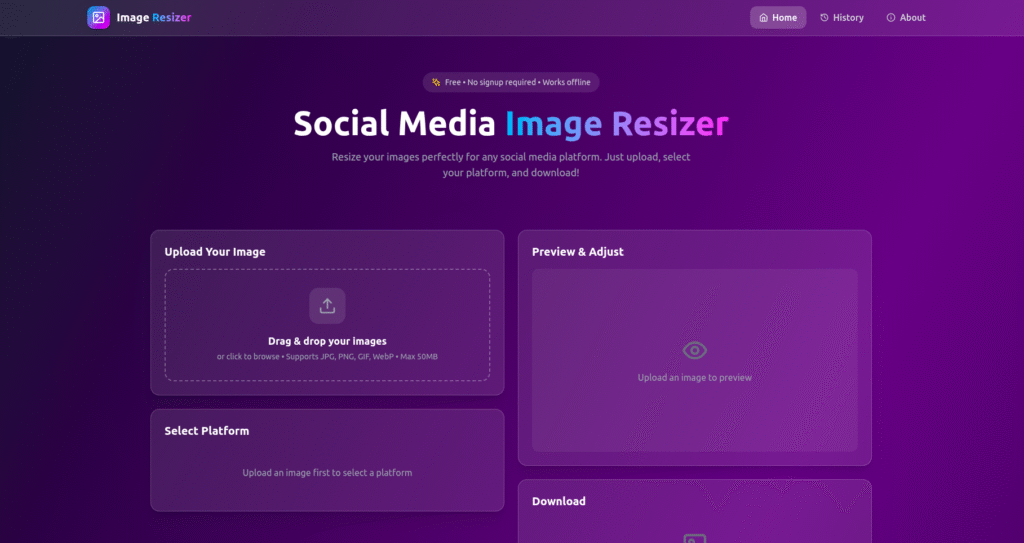
A free social media image resizer is a tool that automatically adjusts image dimensions to fit social media platforms like:
- Twitter (X)
- YouTube
Instead of manually cropping or guessing sizes, users get images that fit platform guidelines perfectly.
As a result, posts look more professional and consistent.
How a Free Social Media Image Resizer Works
Even though the tool is easy to use, it follows a smart process in the background.
Step 1: Upload the Image
First, the user uploads an image. This can be a photo, banner, poster, or design file.
Step 2: Platform Selection
Next, the user selects the target platform. For example:
- Instagram post
- Facebook cover
- LinkedIn banner
- Twitter header
Each option has predefined dimensions.
Step 3: Smart Resizing
Then, the system resizes the image automatically. During this step, it:
- Maintains aspect ratio
- Avoids unnecessary cropping
- Keeps image quality high
Because of this, the final image looks clean and sharp.
Step 4: Download the Resized Image
Finally, the user downloads the resized image and uploads it directly to social media.
The entire process takes only a few seconds.
How to Use the Free Social Media Image Resizer
Using the tool is very simple:
- Upload your image
- Choose the social media platform
- Click “Resize”
- Download the optimized image
No design software or sign-up is required. Therefore, anyone can use it instantly.
Who Can Use a Free Social Media Image Resizer?
This tool is helpful for many users, including:
- 📱 Social media managers
- 🎨 Designers and creators
- 🛍️ Online businesses
- 📢 Marketing teams
- 👤 Personal brand builders
Because it’s free and easy, it fits both personal and professional use.
Why We Built This Tool Using PromptXL
We built this free social media image resizer using PromptXL.
PromptXL allowed us to:
- Build the app with real project files
- Control image resizing logic
- Add support for multiple platforms easily
- Keep the app fast and scalable
Instead of relying on a closed no-code tool, PromptXL gave us full ownership of the code.
How PromptXL Helps Build Better Image Tools
With PromptXL, we were able to:
- Write clean backend logic
- Handle large image uploads safely
- Optimize performance for multiple sizes
- Add new platforms without rewriting the app
Because PromptXL supports flexible deployment, this tool can grow over time.
Free Social Media Image Resizer vs Typical Tools
| Feature | Typical Online Resizers | Built with PromptXL |
|---|---|---|
| Platform support | Limited | Wide |
| Image quality | Medium | High |
| Custom control | Low | Flexible |
| Code ownership | None | Full |
| Scalability | Limited | Strong |
This makes PromptXL-built tools more reliable in the long run.
Can This Tool Grow Into a Full Product?
Yes. Since it’s built using PromptXL, we can:
- Add user accounts
- Save brand presets
- Support bulk resizing
- Introduce paid plans later
This makes it ideal as both a free tool and a future SaaS product.
Final Thoughts
A free social media image resizer saves time, improves post quality, and removes guesswork from image sizing.
By building this tool with PromptXL, we ensured:
- Clean resizing results
- Fast performance
- Full control over the code
- No platform lock-in
If you want to build practical tools like this, PromptXL gives you the right foundation.
🚀 Build Your Own AI PDF Summarizer
Create your project: https://app.promptxl.com
Learn more: https://promptxl.com
Build real AI tools with full control, real files, and multi-LLM intelligence.
If you want to explore more free AI tools, check out the PromptXL Marketplace:
https://app-market.promptxl.com/
Build real AI tools with full control, real files, and multi-LLM intelligence.