

Choosing the right color from an image can be frustrating. Designers, developers, and marketers often need exact color values from screenshots, photos, or designs. Because of this, many users now rely on an AI color picker from image to get accurate results instantly.
In this blog, we’ll explain:
- What an AI color picker from image is
- How it works step by step
- How to use it effectively
- How we built this tool using PromptXL
What Is an AI Color Picker From Image?
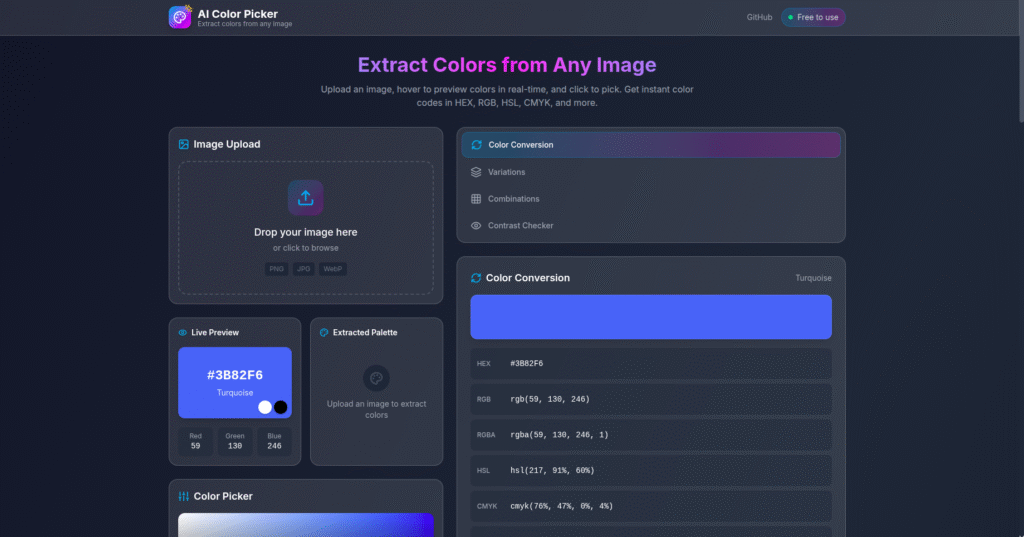
An AI color picker from image is a tool that:
- Accepts an uploaded image
- Analyzes the pixels inside the image
- Detects and extracts colors automatically
Instead of guessing or manually sampling pixels, users instantly get:
- HEX color codes
- RGB values
- Dominant color palettes
As a result, design and development work becomes faster and more accurate.
How an AI Color Picker From Image Works
Although it looks simple on the surface, an AI color picker follows a smart workflow behind the scenes.
Step 1: Upload the Image
First, the user uploads an image. This can be:
- A website screenshot
- A logo
- A photo
- A UI design
The tool supports common formats like JPG and PNG.
Step 2: Image Analysis
Next, the system scans the image at the pixel level. It looks at:
- Color distribution
- Dominant tones
- Repeated color patterns
This step prepares the image data for AI processing.
Step 3: AI Color Detection
After that, AI identifies meaningful colors from the image. Instead of picking random pixels, it focuses on:
- Main background colors
- Accent colors
- Text and UI colors
Because of this, the output feels more useful than basic color pickers.
Step 4: Color Code Output
Finally, the tool returns clean color data such as:
- HEX codes
- RGB values
- Color palettes
Users can copy these values instantly.
How to Use an AI Color Picker From Image
Using an AI color picker from image is very easy:
- Upload your image
- Click “Analyze Colors”
- View extracted colors
- Copy the HEX or RGB code
That’s it—no design tools or technical skills required.
Who Can Use an AI Color Picker From Image?
This tool is useful for many people, including:
- 🎨 UI/UX designers matching brand colors
- 💻 Frontend developers styling websites
- 📢 Marketers creating ads and creatives
- 🖌️ Content creators designing thumbnails
- 🏷️ Brand teams maintaining color consistency
Because it’s fast and accurate, it fits many workflows.
Why We Built This AI Color Picker Using PromptXL
We built this AI color picker from image using PromptXL.
PromptXL made it possible to:
- Build the full app with real project files
- Control how image analysis and AI logic works
- Customize color extraction logic
- Scale the tool without platform limits
Instead of using a closed builder, PromptXL gave us full ownership.
How PromptXL Makes Better AI Tools
Using PromptXL helped us:
- Handle image uploads securely
- Write clean backend logic for image processing
- Add AI intelligence on top of basic pixel analysis
- Improve performance for large images
- Keep the tool flexible and extensible
Because PromptXL supports multi-LLM workflows, we can enhance this tool further in the future.
AI Color Picker From Image vs Traditional Tools
| Feature | Traditional Color Pickers | Built with PromptXL |
|---|---|---|
| Manual pixel selection | Required | Not needed |
| Color intelligence | Basic | AI-powered |
| Palette extraction | Limited | Advanced |
| Code ownership | None | Full |
| Scalability | Low | High |
As shown above, AI-based tools offer much more value.
Can This Tool Become a Full Product?
Yes. Since it’s built using PromptXL:
- User accounts can be added
- Brand palette saving can be introduced
- API access can be offered
- Paid plans can be enabled later
This makes it ideal for both free use and future monetization.
Final Thoughts
An AI color picker from image removes guesswork from color selection and saves valuable time.
By building this tool with PromptXL, we ensured:
- Accurate color extraction
- Clean and scalable architecture
- Full control over the code
- Zero vendor lock-in
If you want to build practical AI tools like this, PromptXL gives you the right foundation.
🚀 Build Your Own AI PDF Summarizer
Create your project: https://app.promptxl.com
Learn more: https://promptxl.com
Build real AI tools with full control, real files, and multi-LLM intelligence.
If you want to explore more free AI tools, check out the PromptXL Marketplace:
https://app-market.promptxl.com/
Build real AI tools with full control, real files, and multi-LLM intelligence.