

Introduction — Supabase Roles vs RLS Explained Simply
When building secure applications with Supabase, one of the most common points of confusion is the difference between Supabase Roles vs RLS. These two security layers work together, but they serve completely different purposes: roles define high-level access at the session level, while Row Level Security controls which specific data a user can read, write, update, or delete.
As you build secure applications — especially SaaS or multi-user systems — you’ll encounter two powerful mechanisms in Supabase:
🔹 Roles
🔹 Row Level Security (RLS)
Many developers assume they do the same job — but they solve very different parts of the security model.
Understanding the difference between Supabase Roles vs RLS is crucial because:
- Using roles without RLS can expose user data
- Using RLS without roles can make admin logic impossible
- Relying on the wrong mechanism can lead to privilege leaks, broken UX, or overly complex security
This guide clarifies how they work, how they fit together, and how to apply them correctly in real applications.
What Are Supabase Roles?
Supabase roles determine what a client or server connection is allowed to do at a high level.
Supabase includes three important roles:
| Role | Purpose | Typical Use |
|---|---|---|
anon | Unauthenticated access | Public content, landing pages |
authenticated | Logged-in users | Apps requiring login |
service_role | Full unrestricted access | Backend scripts, admin tasks |
Roles control query permissions at the database session level, but they do NOT automatically restrict access to individual rows.
Think of roles as:
Your security perimeter.
(Who is allowed inside the building?)
Understanding RLS in Supabase (How It Differs From Roles)
Row Level Security is the mechanism that determines which data a user can actually read, edit, insert, or delete.
Without RLS, authenticated users may query the whole table:
select * from users;With RLS:
select * from users where id = auth.uid();RLS answers:
What can each user do once they’re inside the system?
Supabase Roles vs RLS — Key Differences at a Glance
| Feature | Roles | RLS |
|---|---|---|
| Applies to | Database connection | Individual rows in tables |
| Purpose | Authentication boundary | Fine-grained authorization |
| Example | Logged in vs guest | “Can user edit this task?” |
| Controls CRUD? | ❌ Not directly | ✔ Yes |
| Can bypass? | ✔ Service role | ❌ No (unless policy allows) |
Supabase Roles in Practice
Example policy-level use:
grant usage on schema public to authenticated;
grant select, insert on tasks to authenticated;
Roles decide whether a user can attempt a query — not whether the database will return specific rows.
RLS Policies in Practice
Example secure policy:
create policy "Users can only edit their own tasks"
on tasks
for update
using (user_id = auth.uid());
Even if a user has the authenticated role, RLS prevents unauthorized access.
How Supabase Roles and RLS Work Together in Real Apps
Think of this layered model:
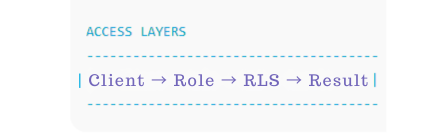
A request goes through:
- Role Check
(Is this user allowed to query this table?) - RLS Check
(Is the user allowed to access THIS specific row?)
You need both for security.
Real-World Scenarios
1 — Public App With Logged-In Features
- Public can read blog posts:
anon - Logged-in users can comment:
authenticated - Users can only edit their comment: RLS
2 — Internal Admin Panel
- Frontend uses restricted backend token
- Admin uses
service_role - RLS may be optional (but recommended)
3 — Multi-Tenant SaaS (Notion-style)
- All authenticated users can read tasks table → role
- Each tenant sees only their own data → RLS
- Admins override team-level access → RLS + role check
Mistakes Developers Make
Using service_role in frontend → Full database access exposed
Enabling roles without policies → Users can still query entire table
Using RLS with no schema planning → No way to determine ownership
Checklist: Which Should You Use?
| If you need… | Use Roles | Use RLS |
|---|---|---|
| Restrict anonymous access | ✔ | |
| Prevent access to other people’s rows | ✔ | |
| Admin-only features | ✔ | ✔ (optional enforcement) |
| Multi-tenant isolation | ✔ | |
| Protect the entire system from frontend access | ✔ | ✔ |
The real power comes from using both together.
Summary — Understanding Supabase Roles vs RLS and Using Them Together
To secure your Supabase application:
✔ Use roles to define authentication boundaries
✔ Use RLS policies to restrict row-level access
✔ Use them together for production-grade authorization
✔ Add roles, membership tables, and organization structure for SaaS scalability
Now you understand the difference — and how to apply each correctly.
Skip the Complexity — PromptXL Builds This for You
Writing RLS and managing role logic manually takes time — and one mistake can expose user data.
PromptXL gives you:
- Pre-built role-aware architecture
- Secure CRUD policies
- Multi-tenant RLS patterns
- Admin + team roles
- Templates that scale like Notion, Slack, and Linear
No guessing. | No debugging. | No broken permissions.
🚀 Build fast
🔐 Deploy secure
⚡ Scale confidently
👉 Try PromptXL — secure Supabase apps without the overhead.