


Introduction — Why Supabase Multi-Tenant RLS Matters
If you’re building SaaS — especially apps where teams or organizations share data — then understanding Supabase Multi-Tenant RLS is essential. Supabase Row Level Security becomes the backbone of your permission model, ensuring each tenant sees only their own data while supporting roles, collaboration, and scalable access rules.
👉 It becomes the entire foundation of your security model.
And here’s the harsh reality:
Most Supabase projects break when scaling from single-user → team-based multi-tenant architecture.
You might have already experienced symptoms like:
- Users seeing other tenants’ data 😱
- Queries failing only for some users
- Admin permissions behaving inconsistently
- Debugging confusion because “it worked on my account”
This guide solves that.
By the end, you’ll know exactly how to design and implement secure, scalable Supabase RLS policies used in apps like:
- Notion
- Slack
- Linear
- ClickUp
- Figma
Let’s build like the pros.
What Does Multi-Tenant Architecture Mean in Supabase RLS?
A system is multi-tenant when:
✔ Multiple groups (organizations, teams, companies) use the same database
✔ Each group’s data stays private and isolated
✔ Permissions define who can see and do what within their tenant
A simplified visual:
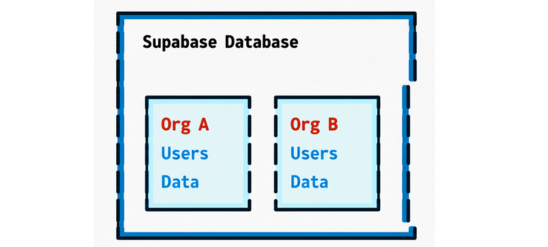
Everyone shares one system — but nobody leaks into another workspace.
Step 1 — Schema Design for Supabase Multi-Tenant RLS
A secure SaaS requires three essential columns on every tenant-scoped table:
| Field | Purpose |
|---|---|
organization_id | Which tenant owns this row |
created_by | Which user created it |
role (optional) | Permissions inside tenant |
📌 Example:
create table tasks (

  id uuid primary key default gen_random_uuid(),
  title text,
  organization_id uuid not null,
  created_by uuid not null references auth.users(id),
  created_at timestamp default now()

);
📍 Without organization_id, multi-tenant access isn’t possible.
Step 2 — Create a Membership Table (This Is Mandatory)
Think of this table as the brain of your access model.
create table memberships (

  user_id uuid references auth.users(id),
  organization_id uuid,
  role text check (role in ('admin','member','viewer')),
  primary key (user_id, organization_id)

);
This tells Supabase:
- Who belongs where
- Which role they have
- Whether they should have elevated permissions
Step 3 — Add the Core Multi-Tenant RLS Policy Pattern
This is the base rule all policies will build from:
organization_id in (

  select organization_id
  from memberships
  where user_id = auth.uid()

)
If a user isn’t part of the organization → access denied.
Step 4 — Apply CRUD-Level Policies
🟦 SELECT (Read)
create policy "Tenant read access"
on tasks
for select
using (
  organization_id in (
    select organization_id from memberships where user_id = auth.uid()
  )
);
🟩 INSERT (Create)
create policy "Tenant insert access"
on tasks
for insert
with check (
  organization_id in (
    select organization_id from memberships where user_id = auth.uid()
  )
);
🟨 UPDATE (Modify)
Add admin override:
create policy "Tenant update access"
on tasks
for update
using (
  organization_id in (
    select organization_id from memberships where user_id = auth.uid()
  )
  and (
    created_by = auth.uid()
    or exists (
      select 1 from memberships
      where user_id = auth.uid() and role = 'admin'
    )
  )
);
🟥 DELETE (Remove)
Admins only (optional):
create policy "Tenant delete access"
on tasks
for delete
using (
  exists(
    select 1 from memberships
    where user_id = auth.uid() and role = 'admin'
  )
);
Step 5 — Test Like a Production SaaS
Testing one user isn’t enough.
Use this checklist:
| Role Type | Expected Behavior |
|---|---|
| Anonymous | No access |
| New user | Zero visibility |
| Regular member | CRUD on own tenant |
| Admin | Elevated access |
| User in multiple orgs | No cross-tenant leak |
Step 6 — Optimize for Scale
Add indexes on:
organization_id
created_by
📍 This ensures fast filtering as tenants grow.
Common Mistakes to Avoid
❌ Hard-coding user IDs
❌ Using service_role in frontend
❌ Missing membership table
❌ Only creating SELECT policy
❌ Not testing cross-organization users
Final Summary — Your Multi-Tenant RLS Blueprint
To build secure SaaS using Supabase:
✔ Add organization_id & created_by
✔ Create a membership table
✔ Apply tenant-aware CRUD policies
✔ Add role-based overrides
✔ Test multiple user types
✔ Optimize indexes for performance
This is how professional SaaS platforms scale securely.
Want This Done Automatically? Use PromptXL.
PromptXL generates:
- Multi-tenant schemas
- Membership models
- Admin/member/viewer RBAC
- Full Supabase RLS policy sets
- Ready-to-deploy SaaS boilerplate
No guessing | No debugging nightmares | accidental data leaks.
Build SaaS like Notion or Slack — without writing all policies manually.
🚀 Build fast
🔐 Deploy secure
⚡ Scale confidently
👉 Try PromptXL — multi-tenant Supabase, done right.